


Pin Up App: Download the Official Mobile Casino and Start Playing!
At Pin Up Casino Guyana, we know your time matters — that’s why we created the Pin Up app to bring the full casino experience straight to your phone. It’s smooth, fast, and built to keep up with you.
From the moment you log in, you’ll have direct access to everything you need — games, bonuses, account tools — all in one place. No delays, no fuss. Whether you’re playing at home or on the go, the Pin Up app is your trusted way to stay connected to what you enjoy most.
All Pin Up’s Best Features, Optimized for Mobile
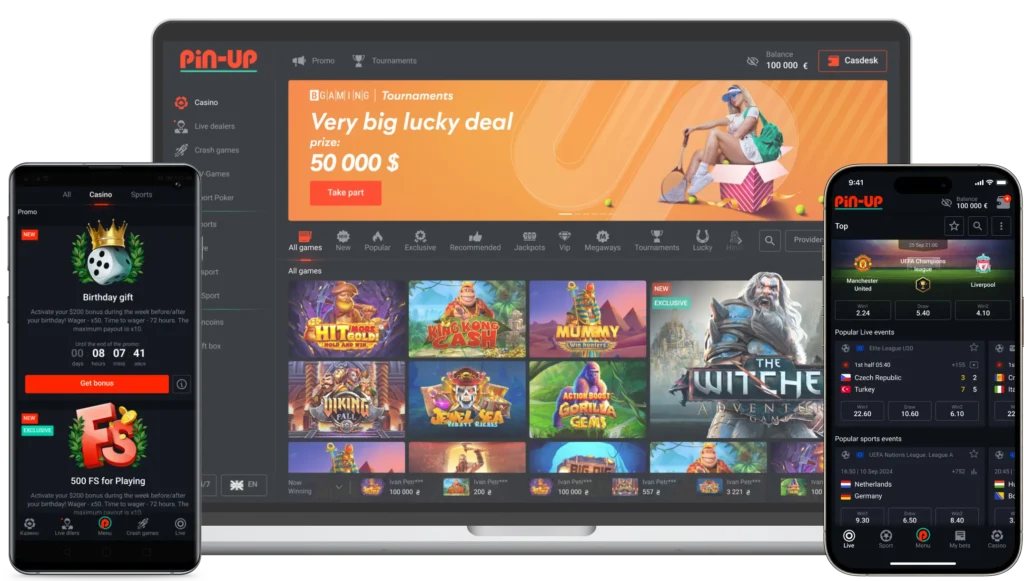
We built the Pin Up Casino app with one thing in mind — making your experience smooth, fast, and truly mobile-first. No clunky menus, no delays — just everything you need, exactly where you’d expect it.
Here’s what makes it work so well:
- Access to the full range of casino games, from quick slots to immersive live tables — all ready to launch in seconds.
- Secure and fast payments that make your first deposit and every one after it feel effortless, with full transaction history always at hand.
- A convenient Promo page that keeps all bonuses at Pin Up in one place. Whether you’re after a welcome deal or a weekend boost, you’ll find it easily.
- Real-time updates through instant notifications, so you never miss a promo, a feature release, or an account alert.
- A user-friendly interface that feels natural on any screen — swipe, tap, and scroll just like you would in any modern app.
We didn’t just shrink the site to fit your phone. We reimagined the entire experience to feel like it was made for mobile — because it was. From faster load times to intuitive layouts, everything is designed to keep you focused on what matters: enjoying your time with the Pin Up app, wherever you are.
How to Download and Install the Pin Up APK
Getting the Pin Up Casino app on your Android phone doesn’t take long, but it does require a quick manual step. Since we distribute the Pin Up APK through our official site (not Google Play), you’ll need to allow installation from outside sources — a standard process for many apps.
Follow these steps to install:
- Look for the Android section on the Pin Up Casino website and download the APK file.
- When the download finishes, swipe down from the top of your screen and tap the file notification — or find it later in your Downloads folder.
- If this is your first time installing an app manually, your phone will ask for permission. Head to Settings > Security and enable “Install from Unknown Sources.”
- Return to the file and tap it to start the installation.
- Wait for the app to install — it usually takes less than a minute.
- Once it’s done, you’ll see the Pin Up app icon on your home screen or app drawer.
That’s it. You can now log in and explore the app — just like you would on the site, only faster and easier for Android users. Plus, you’ll get direct access to games, bonuses, and support, all without needing a browser.
Official Pin Up App Security and Licensing
Security isn’t just a feature — it’s part of how we’ve built the Pin Up app from the ground up. From the moment you download it, your connection is protected by trusted SSL/TLS encryption, the same technology used by leading financial platforms. That means your data — from login details to payment info — stays between you and Pin Up.
To ensure you’re always getting the real thing, the Pin Up official app is only available through our website. We don’t rely on third-party stores or unknown links. That way, you avoid the risks that come with modified or unofficial versions.
Behind the scenes, the Pin Up app runs under international licensing regulations. Every game inside is powered by certified Random Number Generators (RNGs), so results are fair, transparent, and impossible to predict — exactly as they should be.
When you use our app, you’re not just playing — you’re using a system that’s secure, verified, and held to the highest operational standards we know you expect.
Pin Up for Apple Devices: The Optimal Mobile Site Experience
If you’re using an iPhone or iPad, there’s no need to install a separate app — the Pin Up app experience is fully available through our mobile site. We’ve tailored it specifically for iOS users, so it works smoothly across Apple devices without requiring a download.
The site is fast, responsive, and built to feel like something you’ve used before. Navigation is simple, games load quickly, and everything — from account access to support — is right where it should be. It’s the same set of features you’d find in the Pin Up Casino app, just delivered through your browser in an optimized format.
Tip: For quicker access, open the site in Safari, tap the Share icon, and choose “Add to Home Screen.” That way, you’ll have a Pin Up icon on your home screen — making it feel just like a native app, ready whenever you are.
Technical Requirements for Seamless Play
To ensure everything runs smoothly from the start, your device should meet the minimal system requirements. This helps avoid issues like freezing, slow loading, or game interruptions.
For Android devices (Pin Up Casino app):
- Mobile operating system: Android 8.0 or above
- Minimum 2 GB RAM
- At least 100 MB of available storage
- Updated system settings and Google services
For mobile site users:
- Use a modern browser with the latest version installed
- Make sure your internet connection is stable — Wi-Fi or 4G is best
- Enable JavaScript and cookies in your browser settings
Even if you’re not using the newest phone, the Pin Up app and mobile platform are built to work efficiently. You’ll be able to open games, manage your account, and navigate between sections without delays or technical hiccups — no heavy load times or complicated setup required.
Stay Ahead of the Game: Updating Your Pin Up App
To keep things running smoothly, it’s important to use the latest version of the Pin Up Casino app. Updates give you access to recent changes in design, new features, and improvements that help the app work better across different devices.
When a new version is ready, you’ll get a message inside the app. You’ll be prompted to download the updated Pin Up Casino APK directly from our website — no searching or extra steps needed. Once the file is saved, opening it will install the update over your current version.
Your account stays exactly how you left it. There’s no need to log in again or reset anything. The update process is simple, safe, and keeps your experience secure without changing your personal settings.
By staying up to date, you’re making sure the app continues to perform the way it should — reliably, securely, and without surprises.
Pin Up App vs. Mobile Site
Some players prefer having a dedicated app. Others like the convenience of opening a browser. We support both — the Pin Up app and the mobile version of our site — so you can use whichever feels more natural for your routine.
We’ve laid out the key differences below so you can choose what fits you best:
| Feature | Pin Up App | Mobile Site |
|---|---|---|
| Game access | Full game lobby via the Pin Up mobile app | Full game lobby through browser |
| Speed and stability | Tuned for quick responses and smooth flow | Varies by device and connection |
| Setup | Download and install the Pin Up Casino app | No install needed — just open the site |
| Keeping it updated | Manual updates via APK | Always current in your browser |
| Alerts and reminders | Supports push notifications | Not supported |
| Design | Built-in, swipe-friendly layout | Clean, browser-based layout |
| Privacy & protection | Downloaded directly and encrypted | Browser security with HTTPS |
Whether you go with the app or stick to your browser, everything you need is ready when you are.
Get Help and Manage Your Profile on the Pin Up App
Inside the Pin Up app, managing your account is simple. You can update personal details, check which bonuses are currently active, or change your password — all without digging through endless menus. Everything is organized to help you find what you need without delay.
If something doesn’t look right or you need a quick answer, our support team is easy to reach. Through the Pin Up Casino app, you can open a live chat, fill out a contact form, or browse the built-in FAQ for immediate guidance. No need to leave the app or wait for email replies.
We’ve made sure the app gives you full control over your profile, just like if you were using the desktop site — only faster and in your pocket. It’s all about keeping things clear, accessible, and easy to use whenever you need them.